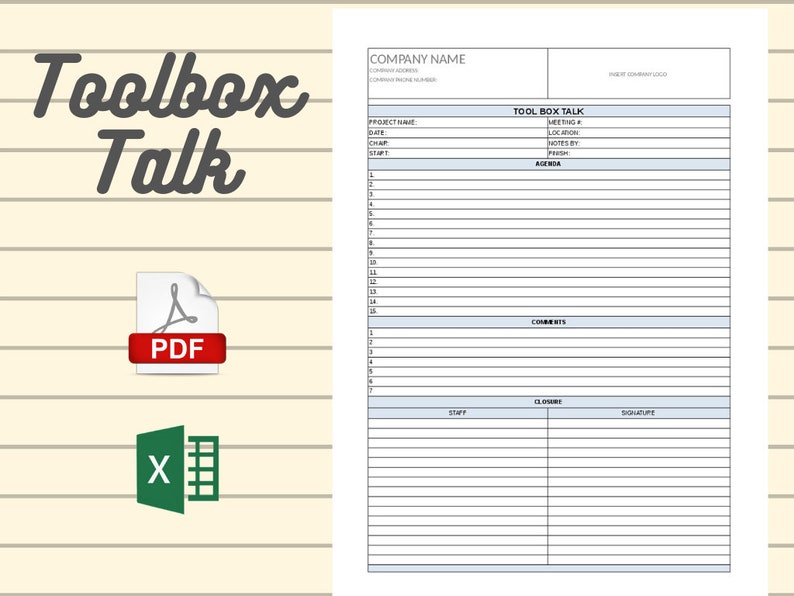
Safety doesn’t happen by accident—it’s built through consistent communication. One of the most effective tools for reinforcing safety on job sites is the toolbox talk. Yet many teams struggle to start simply because they don’t have a clear, professional format to follow. That’s where a free toolbox talk template in Word becomes essential.
This isn’t just about filling out a form. A well-structured template ensures that every safety meeting covers critical points: hazards, controls, responsibilities, and signatures. It creates accountability, supports compliance, and reduces the risk of incidents. Most importantly, it saves time.
Below, you’ll get access to a practical, ready-to-use Word template—plus guidance on how to make the most of it.
Why You Need a Toolbox Talk Template in Word
Word documents are the backbone of workplace documentation. They’re editable, printable, and compatible with nearly every device. Unlike PDFs or online-only forms, a Word-based toolbox talk template gives you flexibility.
Here’s why Word works best:
- Easy to customize: Change headers, add your company logo, or adjust sections for specific trades.
- Offline access: No internet? No problem. Edit and print from any computer.
- Familiar interface: Most site supervisors already know how to use Word.
- Track revisions: Use version history to improve talks over time.
Without a template, safety meetings risk becoming inconsistent or superficial. A carpenter might cover fall protection in detail, while an electrician skips PPE discussion altogether. A standardized format keeps everyone on the same page—literally.
What to Include in Your Toolbox Talk Template
A generic form won’t cut it. An effective toolbox talk template must be comprehensive yet concise. Here are the non-negotiable sections:
1. Meeting Details
- Date and time
- Location (e.g., North Tower, Floor 5)
- Crew or team name
- Supervisor leading the talk
2. Topic & Hazard Focus Choose one specific topic per session. Examples:
- Ladder safety
- Confined space entry
- Hot work precautions
- Electrical hazard awareness
3. Key Discussion Points Break down:
- What the hazard is
- Where it might occur
- How it can cause injury
- Real-life near-misses or incidents (if applicable)
4. Controls & Best Practices List actionable safety measures:
- Use of guardrails
- Lockout/tagout procedures
- Proper PPE (gloves, goggles, etc.)
- Machine inspection steps

5. Attendee Sign-In Sheet Collect names and signatures. This proves participation and understanding. Include a column for printed names and another for signatures.
6. Follow-Up Actions Assign responsibilities:
- Who will check ladder condition?
- When will PPE be audited?
- Is retraining needed?
This structure turns a casual chat into a documented safety process.
Common Mistakes to Avoid
Even with a solid template, teams fall into traps that weaken the impact of toolbox talks. Avoid these:
- Covering too many topics: One clear focus per meeting. Trying to discuss fall protection, chemical handling, and fire safety in 10 minutes leads to poor retention.
- Reading verbatim: The template is a guide, not a script. Encourage interaction. Ask, “Has anyone seen this hazard before?”
- Skimming attendance: Unsigned sheets have no legal value. Make signing mandatory.
- Using the same talk every week: Workers tune out. Rotate topics monthly and tailor them to current tasks.
- Failing to act on findings: If the talk identifies a broken guardrail, it must be fixed. Follow-up is part of the process.
A template only works if used correctly. Train supervisors not just on how to run a talk, but why each element matters.
5 Free Toolbox Talk Template Sources (Word Format)
Not all free templates are created equal. Some are outdated, too vague, or poorly formatted. Below are five reliable sources offering free, downloadable Word templates:
| Source | Highlights | Limitations |
|---|---|---|
| OSHA.gov | Official, compliant with standards. Clean layout. | Minimal design; may need branding updates. |
| SafetyCulture (iAuditor) | Modern, editable .docx files. Includes digital checklist options. | Requires email sign-up for full access. |
| HSE.gov.uk | UK-based but globally applicable. Strong focus on risk assessment. | Metric units and terminology may need conversion. |
| Creative Safety Supply | Industry-specific templates (construction, manufacturing). Professional look. | Light on customization guidance. |
| WorkSafeBC | Canadian standard, but highly transferable. Excellent hazard examples. | Some forms include provincial references. |
All of these offer downloadable Word files. We recommend starting with the OSHA or SafetyCulture options—they’re the most widely adopted and easiest to edit.
💡 Pro Tip: Download 2-3 templates, then merge the best parts. For example, use OSHA’s structure but adopt SafetyCulture’s visual layout.
How to Customize Your Template for Maximum Impact
A generic form won’t resonate with your team. Take 20 minutes to make it yours:
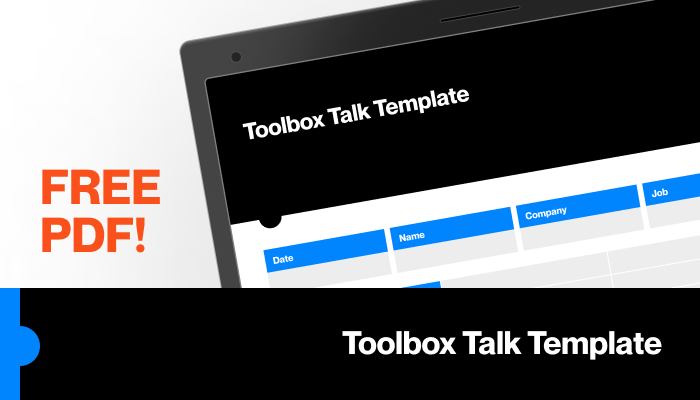
- Add your company logo and colors – Reinforces ownership and professionalism.
- Insert site-specific hazards – For example, “Overhead crane operations near loading bay” instead of just “Heavy machinery.”
- Include emergency contacts – List site safety officers, first aiders, and emergency numbers at the bottom.
- Create topic rotation schedule – Attach a 12-week plan so supervisors know what to cover each week.
- Translate if needed – If your crew speaks multiple languages, keep the form in English but provide a translated handout.
Customization increases engagement. Workers are more likely to listen when the talk feels relevant to their job, not a generic corporate mandate.
When to Update or Replace Your Template
A toolbox talk template isn’t set-and-forget. Review it at least twice a year. Update when:
- New equipment or processes are introduced
- Incident investigations reveal communication gaps
- Regulatory standards change (e.g., updated OSHA rules)
- Workers provide feedback that talks are "repetitive" or "not useful"
Also consider digitizing if paper logs are hard to manage. Tools like iAuditor or SafetyCulture allow mobile sign-ins and cloud storage—though a Word template remains the best starting point for most teams.
Real-World Use Case: Roofing Crew Safety Talk
A roofing contractor in Texas uses a customized Word template every Monday. Last month, they focused on heat stress prevention.
Key elements from their talk: - Hazard: Temperatures above 95°F with high humidity - Controls: Mandatory 10-minute breaks every hour, cool water stations, buddy system - Discussion: Supervisor shared a near-miss where a worker fainted after skipping water breaks - Sign-in: All 12 crew members signed, acknowledging the risks and procedures
Two weeks later, a worker noticed a teammate showing early signs of heat exhaustion. Thanks to the talk, he acted quickly—got him into shade and reported it. No injury occurred.
This isn’t luck. It’s the result of consistent, structured communication powered by a simple Word document.
Download & Start Today
A free toolbox talk template in Word is more than a document—it’s a safety lifeline. The right template saves time, ensures compliance, and most importantly, protects people.
We’ve outlined the essential components, where to find reliable free versions, and how to make them effective on your site. Now, take action.
Download a template today. Customize it with your details. Run your next safety talk with clarity and confidence.
Because when it comes to safety, preparation isn’t just best practice—it’s non-negotiable.
Frequently Asked Questions
Where can I get a free toolbox talk template in Word? Reputable sources include OSHA.gov, SafetyCulture, WorkSafeBC, HSE.gov.uk, and Creative Safety Supply—all offer free .docx downloads.
Can I edit the template after downloading? Yes. Word templates are fully editable. Add your logo, change topics, or adjust sections to fit your operations.
How often should toolbox talks be held? Weekly is ideal, especially in high-risk industries like construction. At minimum, hold them monthly or when new hazards arise.
Do all workers need to sign the form? Yes. Signatures confirm attendance and understanding. Unsigned sheets reduce legal protection and audit compliance.
Can I use the same template for different job sites? Yes, but customize the hazard section for each location. A warehouse talk shouldn’t be identical to a high-rise construction talk.
Are digital toolbox talks better than paper? Digitization helps with storage and analytics, but paper Word templates are still effective—especially in remote or low-connectivity areas.
What topics should I cover in toolbox talks? Focus on current tasks: fall protection, PPE, equipment safety, chemical handling, emergency procedures, and site-specific risks.
FAQ
What should you look for in Free Toolbox Talk Template in Word – Download & Customize? Focus on relevance, practical value, and how well the solution matches real user intent.
Is Free Toolbox Talk Template in Word – Download & Customize suitable for beginners? That depends on the workflow, but a clear step-by-step approach usually makes it easier to start.
How do you compare options around Free Toolbox Talk Template in Word – Download & Customize? Compare features, trust signals, limitations, pricing, and ease of implementation.
What mistakes should you avoid? Avoid generic choices, weak validation, and decisions based only on marketing claims.
What is the next best step? Shortlist the most relevant options, validate them quickly, and refine from real-world results.


.png?quality=75&width=640&auto=webp)